
|
Additional ExtremeII terminals
Select your # of ExtremeII additional clocks here
|
Time Pilot ExtremeII ENHANCED
Includes 2000 employee TIMEPILOT SOFTWARE
Exports to ADP, Excel, Paychex, Peachtree, SAGE50 and QuickBooks
Click here to see the YouTubeVideo
891078002375
TimePilot Extreme Blue Outdoor Time Clock System
Rugged, portable time clock system designed for construction sites and harsh outdoor environments.
Description
The TimePilot Extreme Blue system is built for job sites where standard time clocks cannot survive. It is designed to operate reliably in cold, wet, dusty, and hot conditions, making it ideal for construction sites and outdoor work locations.
Although designed for outdoor use, it can also be used indoors. The clock locks securely to a metal mounting plate to deter theft and can be easily relocated to another site when needed.
How It Works
- Clock is bolted and locked to a secure wall plate
- Each employee uses an iButton to clock IN and OUT
- Clock stores up to 10,000 punches between downloads
- Punches are transferred to a USB memory stick
- Manager iButton is required to download data
- Data is uploaded to TimePilot software via USB or email
Key Features
- Supports up to 1,000 employees
- Built for harsh outdoor conditions
- Multi-clock capability across job sites
- Easy setup and relocation
- Secure, theft-resistant mounting
Compatibility & Specs
| Employee Capacity |
Up to 1,000 |
| Punch Storage |
Up to 10,000 punches |
| Data Transfer |
USB memory stick |
| Security |
Manager iButton required for downloads |
| UPC |
891078002375 |
TimePilot Extreme Kit - What's Included:
- Metal Case TimePilot Extreme clock with metal mounting bracket
- Unique Programmable Padlock
- Ten iButtons with black keyfobs
- One Management Key
-
Blue Dot iButton Receptor
**With an iButton Receptor mounted at your computer, you just touch the iButtons to either of the blue dots to set them up for your employees on TimePilot PC: On-Premise, TimePilot Vetro or TimePilot Standard.
- Rugged USB drive - for use instead of - or in addition to - the included Cloud application
- 2000 employee Time Central Enterprise software
- Quick-Start Guide and Manual
- Comprehensive printed manual is in the software
- No CD. The most current, updated software downloads from TimePilot's server to you.
- 30 days factory technical support, one year product guarantee
TimePilot has worked with a number of payroll companies and Professional Employment Organizations (PEOs) to make it easy for their customers to use the TimePilot system. We've also prepared interfaces for all the leading payroll software packages.
CLICK HERE TO WATCH THE TIME PILOT EXTREME BLUE ENHANCED VIDEO
What's a payroll interface?
It's the part of the TimePilot software that takes the payroll data that TimePilot collects and translates it into a format your payroll company or payroll software can understand. Don't see your format here? Call us!
Included Payroll Exports (more are being released):
Enterprise INFORMATION links:
Multiple levels of access - Managers, Supervisors, Administrators: INFO.jpg
Connection with Cloud services like Dropbox (and Dropbox link): (Bluetooth System) INFO.jpg
Supervisors can indicate approval of a transaction: INFO.jpg
Enhanced reports:
Tardy, Job Site, Out Time, Late/Early, Daily Timesheet: INFO.jpg
Extreme Blue Enhanced - Bluetooth enabled
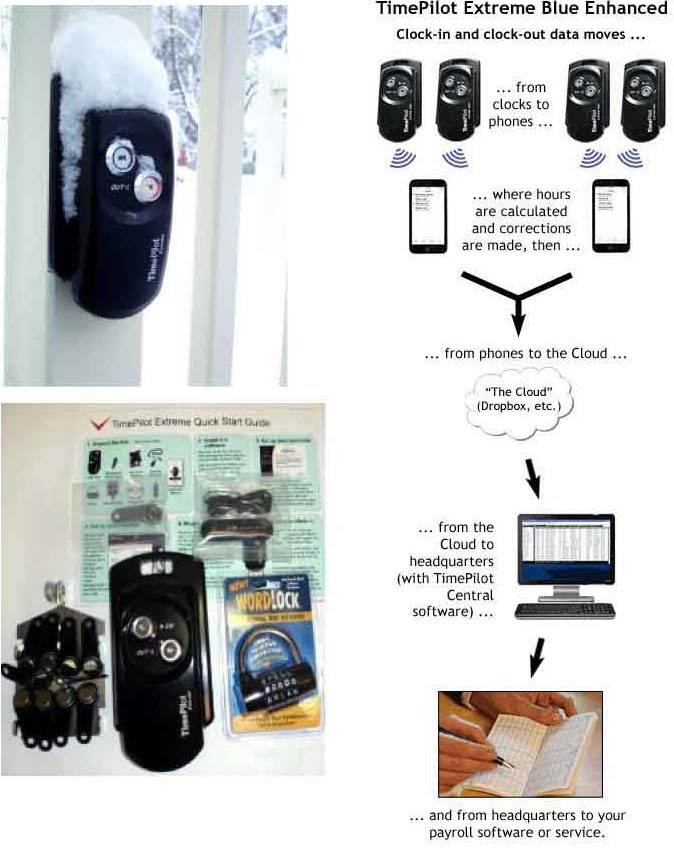
Our newest systems are rugged, weatherproof, battery-powered and designed to be used at worksites and other outdoor areas.
Send the data to headquarters for processing with TimePilot's Windows-based software
Highlights of the Extreme Blue Enhanced system
- Rugged and weatherproof; runs for a year on 4 AA batteries.
- Handles up to 2,000 users.
- Padlock and steel mounting plate keep it secure.
- Each employee uses a single iButton to clock in and out.
- Uses Bluetooth wireless technology to send clock-in and clock-out data to your iPhone and Android smartphone app. (App is a free download from Apple's App Store or Google Play.)
- Integrates with other TimePilot time and attendance products
Job Costing with Time Pilot
This feature can be used to calculate the amount of time an individual project takes during the workday, or how long an employee takes to complete a particular project. All you need to start "job costing" is iButtons in different colors. They're available from us in 11 different colors, in quantities of 10 each.
Example: You are a remodeling company, and you are using TimePilot Extreme. In a single shift, your employees might be doing framing, then putting uppdrywall, then painting - and one employee might be doing some plumbing, too. TimePilot's job costing feature allows you to see how each employee spend his or her day and also to determine how much time all employees spent framing, drywalling, painting and plumbing.
To do this, each employee will carry a black iButton and several colored ones. The black iButton will be used to clock in and out at the start and end of the day for payroll purposes; the colored iButtons ared used to record the start time and end time of particular jobs or tasks. For instance, when an employee starts framing, he or she would tap their yellow iButton to the "in" probe. When finished, they would tap the yellow iButton to the "out" probe, then tap their red iButton to the "In" probe to indicate they are starting drywalling.
Using the remodeling company as an example we've put together a report on how to use your system for job costing. Download it here: [CLICK for PDF]