Citadel GT2000 Cloud Biometric Time Clock
Description
The Citadel GT2000 time clock is a cloud-based biometric time clock designed for use with the Citadel Time Cloud attendance system. It records employee punches using fingerprint recognition, RFID badges, or PIN entry and immediately transfers time data to the cloud for centralized tracking and reporting. Businesses use the GT2000 to improve payroll accuracy, eliminate manual time collection, and maintain real-time visibility into attendance activity.
The GT2000 uses a touchscreen tablet interface that allows employees to clock in quickly while administrators manage timecards and reports remotely through the cloud portal. Punch data synchronizes automatically when connected, and offline mode allows punches to be captured and stored during temporary network interruptions before uploading once connectivity returns. This design maintains consistent time tracking even in environments where internet availability may vary.
From a system standpoint, the GT2000 is commonly deployed when replacing paper time cards or older standalone clocks with a centralized cloud-based solution. Automated calculations, configurable punch policies, and centralized reporting help standardize attendance rules across departments or multiple locations while reducing manual payroll adjustments.
Cloud-connected systems such as the Citadel GT2000 are typically selected during upgrades or expansion when businesses require consistent policy enforcement and remote access to time data. System setup, software updates, and ongoing technical support are provided directly by the manufacturer’s U.S.-based support team.
Compatibility / Usage / Key Features
- Cloud-connected biometric time clock
- Fingerprint, RFID, or PIN punching options
- Real-time punch transmission to cloud software
- Offline punch capture with automatic synchronization
- Touchscreen tablet interface
- WiFi or LAN connectivity
- Centralized reporting and attendance monitoring
- Department transfers and break tracking
FAQ
Does the GT2000 require installed software?
No. All administration and reporting are handled through the Citadel cloud system.
Can employees punch during an internet outage?
Yes. The clock stores punches locally and uploads them when the connection is restored.
Is biometric punching required?
No. RFID badges or PIN entry may also be used.
Who provides technical support?
Technical support and setup assistance are provided directly by the manufacturer’s U.S.-based support team.
Related Items
Citadel OB2000 Tablet Time Clock
Citadel RFID Badge Packs
uAttend JR2000 Cloud Time Clock
Amano MTX-30 Electronic Time Clock
- MN2000 biometric cloud/web-hosted facial recognition clock\
- 10 reusable thin proximity (RFID) cards
- Easy-to-follow instructions, toll-free USA support line (9AM - 8PM, EST, M-F)
- Power cable, wall mounting hardware
- 6' CAT5 connection cable
Call us to set up an online appointment for a free factory demonstration
All uAttend web-hosted systems include:
- Unlimited departments - Separate and segment employees any way you like!
- Revision Zones - A Very Powerful Labor Management Tool:
Also known as In-Punch and Out-Punch Rounding Zones, by Department
- Lock Out Zones - Can be set to Refuse punches before the correct start time
- Punch Change Accountability-
Tells you who made the change, when, and from what I.P. address.
- Overtime - Weekly, Daily, and 7th day consecutive overtime
- Who's-IN board - See your work force status in Real Time
- Punch Notifications - Get emails any time any employee punches
- Geofencing - Available when using the mobile phone app
- Punch rounding - Select from several options
- Automatic Lunch Deductions - Customizable for your requirements
- Time Card Approvals - 3 levels of authority to use at your discretion
- Email Time Cards to Employees - Daily, weekly, or once per pay period
- Multiple Time Zones - set regional time zone to employee
- Automatic Break Additions - Stay in compliance with all paid break regulations
- Holidays - Track holidays as paid and set pay codes based on working
- Multiple Pay Periods - Weekly, bi-weekly, semi-monthly, monthly
- View & Print Time Cards in Batches - individually or in batches
- Summary Reports - Data ready to be used for payroll
- Reports - Run time reports by employee, department, or system wide
- Exports - Dozens of payroll reports are supported, including ADP, Paychex, and QuickBooks
- Self Service online help - find the the information you need, when you want it
- Toll-Free Technical Support, 8 - 5, Monday - Friday, PST
- Scheduling - Set up schedules (start and end-times) for departments or individuals.
- Shift Differentials - Administrators can add work shifts and pay rates to their departments and employees.
- Shift Alarms - Supervisors will get e-mail alerts for early or late employee punch times.
- Variable pay rates by employee - pay them different rates for different departments.
- Shift Report - Allows you to view the hours worked for a shift. The data can be listed by employee or shift code and is filtered by date or shift code
- Accruals - Track accrued Vacation, Sick, and other hours per hour worked.
Accrual tracking also gives you the option for including overtime in accrual calculations.
- Much, much more! New features and upgrades are easily added to the system!
All uAttend machines require a low month-to-month subscription. It varies each month based on your peak number of active employees.
uAttend Reports - all uAttend systems have these reports, and more:
Department Reports System Settings and Exports
Time Cards Summary Reports
Quick-Start Guide
Click on any of the lines above, see the reports in Adobe PDF format
Note: Scroll the reports, many have multiple pages for you to view
uAttend is constantly adding new features to the software suite.
Watch this one: How to set it up
All uAttend systems have this feature:
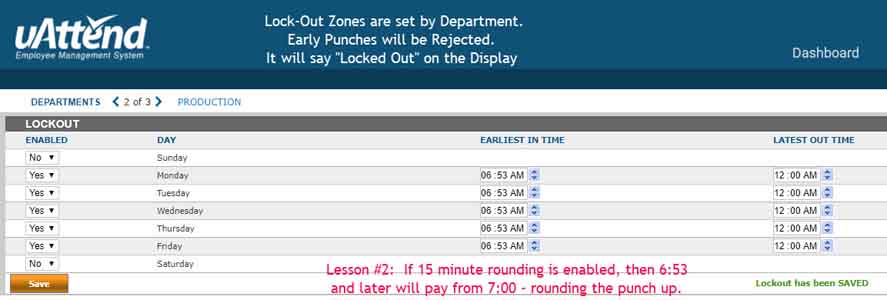
This is used to stop early-in punches.
Example:
Your place officially starts working at 7AM.
Administration people start at 8, Production, and Delivery people start at 7, no earlier.
uAttend lets you set up start-times for every department.
And. let's say Sales and Marketing come and go at will. They then have no such rules.
You group your employees in to departments. These rules govern the departments.
You can pay them to the minute, or you can use a variety of punch rounding methods.
Most companies use 1/4 hour rounding, it's a choice.
In this example, using the uAttend system (click on this line to see all the uAttend products)
you can see that if they attempt to punch or sign-in before 6:53AM, it wil refuse the punch.